

Streams in Node.js — The Most Underrated Performance Superpower
I’m a senior full-stack developer working across system design, DevOps, and AI. I build scalable systems, optimize performance, and explore emerging tech. I’ve written “Machine Learning in iOS” and am now writing a new book on system design, DevOps, and ML. This blog is where I share what I learn, build, and discover.
A few years ago, I built an internal dashboard where users could download large CSV reports. Everything worked perfectly in testing—until a client tried exporting a file with 1.4 million rows.
My server froze… CPU spiked… and then crashed completely.
The culprit?
I was using fs.readFile() and sending the entire file at once.
That day I learned:
In Node.js, not using streams for large data is a silent killer.
Why This Actually Matters
Node.js works on a single thread, so anything that blocks memory (like loading a giant file) can freeze the whole server.
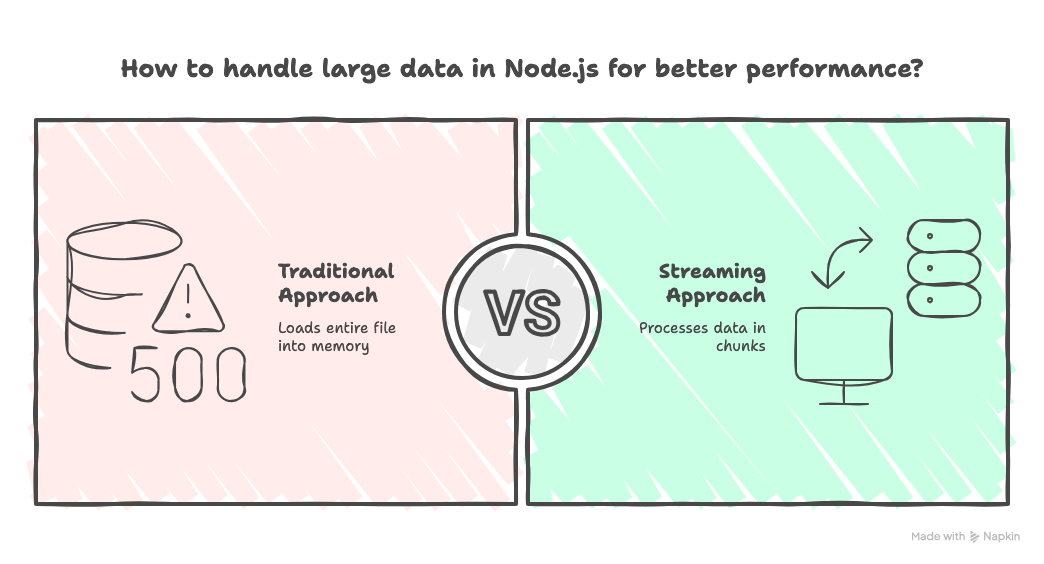
Streams prevent this by processing data piece-by-piece, not all at once.
Streams help you:
✔ handle large files without crashing
✔ improve memory usage
✔ build blazing-fast APIs
✔ reduce server load
This is why all big systems—YouTube, Netflix, GitHub—use streaming internally.
What Streams Really Are
Think of streams like pipes.
Instead of filling the entire bucket, you push small chunks continuously.
Types of Streams in Node.js
| Type | Direction | Example |
| Readable | Data comes from source | File read, HTTP response |
| Writable | Data goes to destination | File write, logging |
| Duplex | Read + Write | TCP sockets |
| Transform | Modify data in-between | Gzip compression |
💡 Real Example: Streaming a File Instead of Reading It
❌ Wrong way (Kills memory)
const fs = require("fs");
app.get("/download", (req, res) => {
  const file = fs.readFileSync("bigfile.zip");
  res.send(file);
});
✔ Right way (Stream chunks)
const fs = require("fs");
app.get("/download", (req, res) => {
  const stream = fs.createReadStream("bigfile.zip");
  stream.pipe(res);
});
Now your server handles GB-level files smoothly.
💡 Example: Streaming Uploads
app.post("/upload", (req, res) => {
  const writeStream = fs.createWriteStream("uploaded.mp4");
  req.pipe(writeStream);

  writeStream.on("finish", () => res.send("Uploaded"));
});
💡 Example: Transform Stream (Gzip Compression)
const zlib = require("zlib");
const fs = require("fs");

fs.createReadStream("input.txt")
  .pipe(zlib.createGzip())
  .pipe(fs.createWriteStream("output.txt.gz"));
☑ Smaller files
☑ Faster transfers
☑ No high memory usage
4. Real Case From My Experience
In another project, we built an "Export to Excel" feature for an e-commerce platform.
The dataset grew from 10k rows → 1.2M+ rows.
Traditional approach = server was dead.
Streaming approach:
Used
pg-query-streamfor Postgres streamingUsed
csv-stringifyto write chunk-by-chunkPiped everything into an Express response
Final result:
✔ Export completed in 3 seconds
✔ Memory usage stayed under 80MB
✔ Zero downtime reported
This is when I truly understood why Node.js streams are a cheat code.
5. Conclusion
Streams prevent memory overload by processing data in chunks
Best for large file uploads/downloads, logs, DB exports
Use
stream.pipe()for clean and fast operationsTransform streams help in compression, encryption, modification
Always prefer streams for files larger than 10MB
Guaranteed performance boost in production apps.
7. Mini Challenge
Convert one of your existing:
file upload
file download
data export
logging
into a stream-based implementation.
Measure the memory before and after — you’ll be shocked.


