The Event Loop Explained in Real Language
I’m a senior full-stack developer working across system design, DevOps, and AI. I build scalable systems, optimize performance, and explore emerging tech. I’ve written “Machine Learning in iOS” and am now writing a new book on system design, DevOps, and ML. This blog is where I share what I learn, build, and discover.
1. A Real Problem I Faced
Last year, a client messaged me in panic:
“Vibhor, our dashboard freezes whenever users upload a CSV. The UI just hangs. Browser issue maybe?”
At first glance, it looked like a frontend bug.
But the real culprit?
A single innocent-looking JavaScript loop that was blocking the event loop and freezing the entire app.
That’s when I realized something important:
Most developers know the event loop exists —
but very few actually understand how their code breaks it.
2. Why This Actually Matters
JavaScript runs on one main execution thread.
That means:
If you block it → UI freezes
If you overload it → backend slows
If you misunderstand it → async code behaves unpredictably
Understanding the event loop helps you build:
✔ Faster frontends
✔ Scalable backends
✔ Predictable async behavior
This is the difference between:
“I write JavaScript”
vs
“I engineer JavaScript systems”
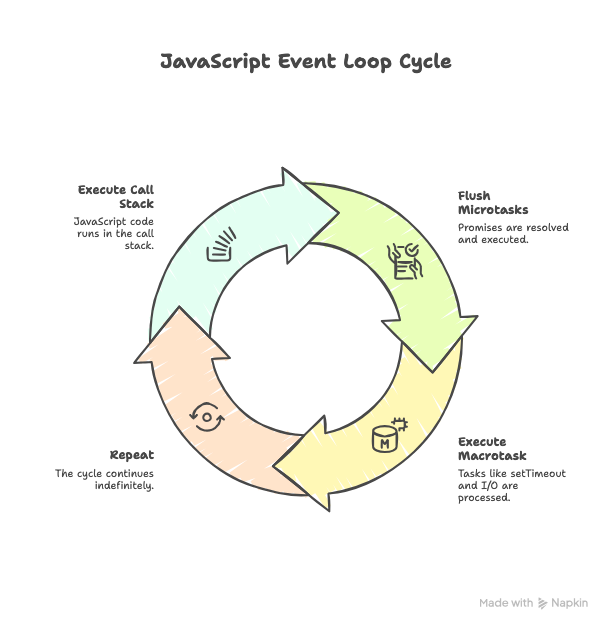
3. Breakdown — The Event Loop in Simple Human Language
🧠 JavaScript Has 3 Core Areas
Call Stack        → Executes your code
Task Queue        → Stores waiting callbacks
Event Loop        → Traffic controller
The Event Loop keeps asking:
“Is the call stack empty?
If yes → push the next waiting task.”
🍽 Real-World Analogy (Restaurant Model)
Call Stack = Chef cooking
Task Queue = Orders waiting
Event Loop = Manager handing orders to chef
If the chef gets stuck cooking one massive dish (a long loop) →
every other order waits → your app feels frozen.
That’s exactly how UI freezing and backend slowdowns happen.
⚡ Microtasks vs Macrotasks (Explained Like a Human)
There are two types of waiting tasks:
Microtasks → Promises → VIP customers
Macrotasks → setTimeout, IO → Regular customers
Rule of the Event Loop:
Serve all VIPs first, then regular customers.
Example:
console.log("A");

setTimeout(() => console.log("B"), 0);

Promise.resolve().then(() => console.log("C"));

console.log("D");
✅ Output:
A
D
C
B
Because:
Promise.then→ microtask (VIP)setTimeout→ macrotask (regular)
4. Real Case From Production
In the CSV upload issue I mentioned earlier, this was the killer:
for (let i = 0; i < 5_000_000; i++) {
  // heavy CSV parsing
}
This blocked the event loop for 3.8 seconds.
During that time:
UI froze
Clicks were ignored
API responses stalled
App looked completely broken
✅ The Fix: Move Heavy Work Off the Main Thread
You have three real-world options:
| Platform | Solution |
| Frontend | Web Workers |
| Node.js | Worker Threads |
| Shared | Job Queues (BullMQ, RabbitMQ) |
✅ Alternative: Batch the Work (No Workers Needed)
function processBigList(list) {
  function batch(start) {
    const end = Math.min(start + 500, list.length);

    for (let i = start; i < end; i++) {
      // process item
    }

    if (end < list.length) {
      setTimeout(() => batch(end), 0);
    }
  }

  batch(0);
}
✅ Result:
UI becomes responsive
No freezing
No blocking
Same logic, better architecture
The UI went from frozen → buttery smooth.
5. Engineering Takeaways
JavaScript has one main thread — protect it
Long loops are the enemy of smooth UI & fast APIs
Microtasks always run before macrotasks
Break heavy work into small chunks
For CPU-heavy tasks → Worker Threads or Job Queues
The event loop is not magic — it’s just a task scheduler
6. Mini Challenge (Engineer's Test)
Rewrite this so it does NOT block the event loop:
for (let i = 0; i < 3_000_000; i++) {
  // heavy work
}
✅ Solutions allowed:
Web Workers
Worker Threads
setTimeout batching
If you can refactor this — you understand the event loop.