

Understanding GrPC: Key Concepts Explained
I’m a senior full-stack developer working across system design, DevOps, and AI. I build scalable systems, optimize performance, and explore emerging tech. I’ve written “Machine Learning in iOS” and am now writing a new book on system design, DevOps, and ML. This blog is where I share what I learn, build, and discover.
gRPC (Google Remote Procedure Call) is a modern, high-performance framework that enables communication between distributed systems.
What is gRPC?
gRPC is an open-source RPC (Remote Procedure Call) framework initially developed by Google. It allows client and server applications to communicate transparently, making remote method invocation feel like local calls.
It is based on HTTP/2 and uses Protocol Buffers (Protobuf) as the interface definition language (IDL) for defining the service contracts.
2. Core Components of gRPC
Client and Server: The client initiates communication by calling a service on the server.
Protobuf (Protocol Buffers): Used to define the service methods and data structures exchanged between the client and the server.
gRPC Runtime: Handles communication, serialization, and network transport between client and server.
Transport Layer: HTTP/2 is used for transport, providing features like multiplexing, header compression, and request prioritization.
Encoding/Decoding: Messages are serialized (encoded) and deserialized (decoded) using Protocol Buffers, which is more efficient than text-based formats like JSON or XML.
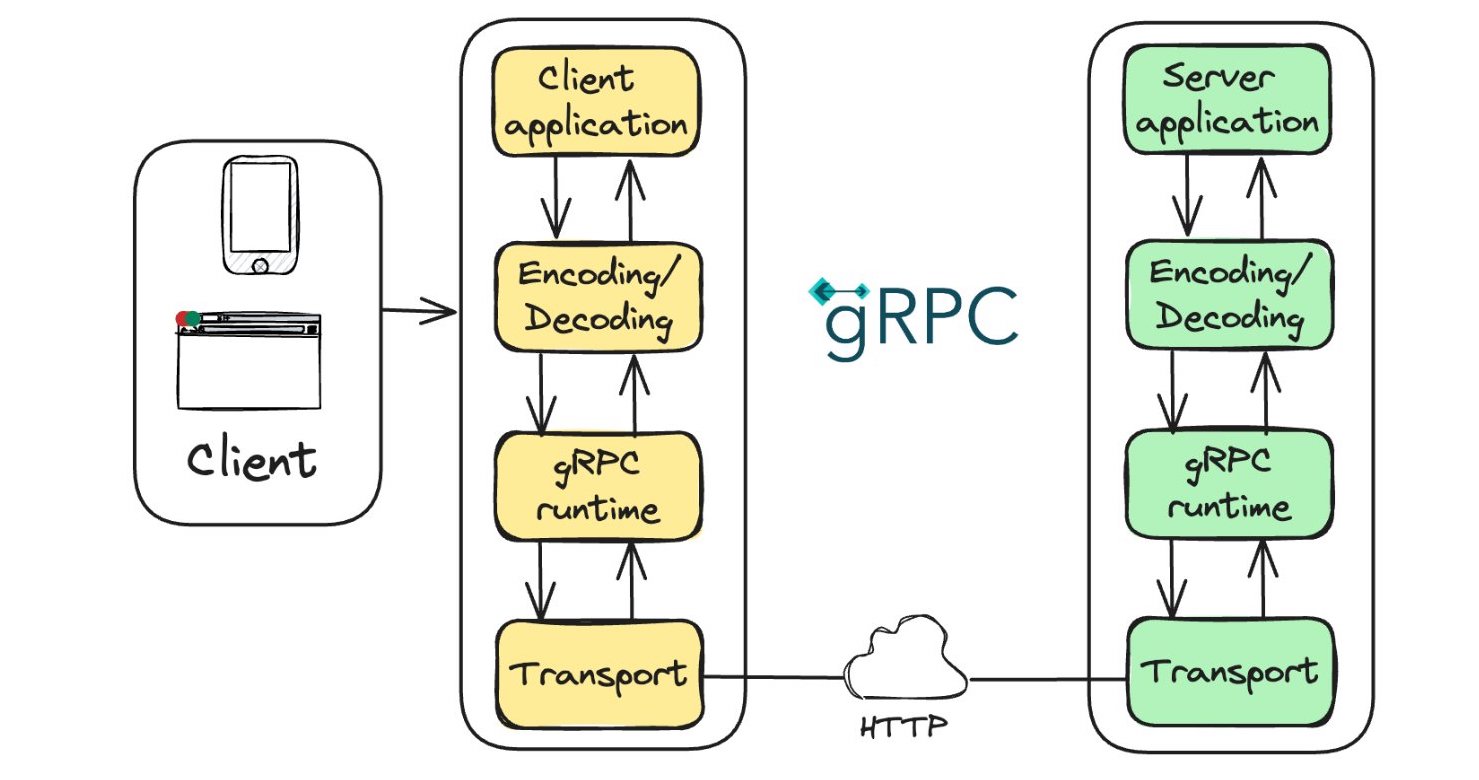
3. How gRPC Works (Diagram Explanation)
Client Application: Initiates a request by invoking a remote procedure, which feels like a local method call.
Encoding/Decoding: The data is serialized into binary format via Protocol Buffers.
gRPC Runtime: Manages the connection, message framing, and flow control using HTTP/2.
Transport: The actual message transport happens over HTTP/2, ensuring low latency, multiplexing, and compression.
Server Application: Receives the request, deserializes it, processes the logic, and responds in a similar way.
4. Why gRPC?
Performance: gRPC uses HTTP/2, which is faster due to multiplexing and smaller packet overhead compared to traditional HTTP/1.x.
Language Agnostic: Supports multiple programming languages (Java, C++, Python, Go, etc.) making it versatile for microservices.
Streaming: gRPC supports four types of communication: unary (single request-response), client-side streaming, server-side streaming, and bidirectional streaming.
Strongly Typed Contracts: Using Protobuf ensures strongly typed definitions, reducing errors and improving reliability.
Efficient Serialization: Binary serialization with Protobuf is faster and more compact than formats like JSON.
5. Types of RPC Calls in gRPC
Unary RPC: Client sends a single request to the server and gets a single response.
Server Streaming RPC: Client sends a single request, and the server responds with a stream of data.
Client Streaming RPC: Client sends a stream of requests, and the server responds with a single response.
Bidirectional Streaming RPC: Both client and server can send a stream of messages in real-time.
6. Key Features of gRPC
Multiplexed Streams: gRPC leverages HTTP/2’s ability to multiplex multiple calls over a single TCP connection.
Load Balancing and Discovery: gRPC supports integration with load balancers and service discovery, which is critical in large distributed systems.
Authentication and Security: gRPC supports mutual TLS, token-based authentication, and other mechanisms to ensure secure communication.
Error Handling: gRPC has well-defined error codes and status mechanisms (using status codes like OK, INVALID_ARGUMENT, NOT_FOUND, etc.) that help in better error management across services.
7. gRPC vs REST
Data Format: gRPC uses Protobuf (binary), while REST typically uses JSON (text). Protobuf is faster and more compact.
Transport Protocol: gRPC uses HTTP/2, while REST typically uses HTTP/1.1. HTTP/2 offers multiplexing and header compression, making gRPC more efficient.
Streaming: gRPC natively supports streaming, while REST usually requires separate mechanisms like WebSockets.
Service Contracts: gRPC requires a formal contract via Protobuf, while REST is more flexible but can lead to loose contracts.
8. When to Use gRPC?
Microservices Communication: When you have services deployed in multiple languages or when performance is critical, gRPC is a better fit than REST.
Low Latency & High Throughput: If the application demands real-time communication or needs to handle a high volume of requests efficiently.
Strict Contracts: When you want strong typing and clear service definitions, Protobuf and gRPC enforce this better than RESTful APIs.
Streaming Scenarios: When your application needs streaming capabilities for continuous data transfer (e.g., video streaming, IoT data, etc.).
9. Challenges and Considerations
Learning Curve: Developers need to be familiar with Protocol Buffers and the gRPC ecosystem.
Tooling and Ecosystem: REST is still more widely used and has richer tooling. gRPC is catching up, but there may be limitations in certain languages or platforms.
Browser Support: gRPC has limited support for browsers, though gRPC-Web can be used to overcome this.
Debugging: Due to binary format (Protobuf), debugging can be harder than with text-based JSON or XML. Tools like grpcurl and grpcui can help.
10. Common Use Cases
Microservice-to-Microservice Communication: gRPC is ideal for internal microservice communication due to its performance and language neutrality.
Real-Time Systems: Bidirectional streaming and low-latency features make it perfect for real-time applications (e.g., gaming, video streaming, chat applications).
IoT and Edge Computing: With its lightweight serialization and efficient communication, gRPC is commonly used in IoT ecosystems.
Mobile Applications: Especially with clients that need to interact with backend services efficiently.
11. Tooling and Libraries
Protobuf Compiler (protoc): This is used to generate language-specific stubs from the
.protofiles.gRPC Gateway: This enables RESTful JSON APIs alongside gRPC by translating HTTP/JSON requests into gRPC.
grpcurl: A command-line tool similar to
curlfor testing gRPC services.Postman: There is ongoing support in Postman for gRPC to aid in testing and debugging.
12. gRPC in the Cloud
gRPC is widely adopted in cloud platforms (Google Cloud, AWS, Azure) where microservices architectures need high-throughput, low-latency communication.
Kubernetes & gRPC: In containerized environments like Kubernetes, gRPC is often used with service meshes like Istio for observability, tracing, and security.
Key Components of the Image:
Client:
- This represents the device or application making the request. It could be a mobile phone, a web browser, or any other system that wants to communicate with the server.
Client Application:
- The client application is the software running on the client that initiates the RPC (Remote Procedure Call). It prepares the data to be sent to the server and handles the server’s response.
Encoding/Decoding (on both Client and Server sides):
The encoding step is responsible for serializing the request data into a format that can be transmitted over the network. In gRPC, this is typically done using Protocol Buffers (Protobuf), a language-neutral, platform-neutral extensible mechanism for serializing structured data.
The decoding step is the reverse: once the data reaches the other side (client or server), it is deserialized back into its original format so that the receiving system can process it.
gRPC Runtime (on both Client and Server sides):
- The gRPC runtime manages the communication and orchestration of the gRPC call. It handles sending the request to the server, receiving the response, and managing the network transport (like HTTP/2) in between. It is responsible for things like retrying failed requests, load balancing, and managing deadlines.
Transport Layer (on both Client and Server sides):
- The transport layer is responsible for sending the actual request over the network and delivering it to the intended recipient. gRPC typically uses HTTP/2 as the transport protocol, which provides benefits like lower latency, multiplexing, and better support for streaming.
gRPC Communication:
- The core gRPC mechanism that facilitates the communication between the client and the server. The client sends a gRPC request, which is then processed by the server. Once the server finishes processing, it sends a response back through the same gRPC mechanism.
Server Application:
- The server application is the counterpart to the client application. It receives requests from the client, processes them, and sends back responses. The server implements the gRPC service that the client interacts with.
Cloud or Internet (represented by a cloud icon):
- This represents the network (usually the Internet or a private cloud) over which the gRPC communication is happening. The transport layer manages the connection, ensuring that the client and server can communicate reliably.
Communication Flow:
Client Initiates the Request: The client application sends a request to the server. The data is encoded using Protobuf or another encoding mechanism.
gRPC Runtime and Transport Layer:
The request is passed through the gRPC runtime, which manages the communication.
The transport layer (HTTP/2) sends the request over the network to the server.
Server Receives the Request:
On the server side, the transport layer receives the request.
The gRPC runtime decodes the data, and the server application processes the request.
Server Responds:
- After processing the request, the server sends back a response through the same layers (encoding, gRPC runtime, and transport).
Client Receives the Response:
- The response reaches the client, where it is decoded, and the client application processes the response.
Important Concepts Illustrated:
Encoding/Decoding: This ensures that data can be serialized and transmitted efficiently over the network.
gRPC Runtime: This abstracts away the complexities of communication and allows both the client and server to focus on their respective logic.
Transport Layer: HTTP/2 is used as the protocol for fast, efficient communication.
Client-Server Interaction: The whole system relies on the gRPC mechanism to make requests, handle responses, and manage the connection between the client and server.
gRPC Benefits Highlighted by the Diagram:
Cross-platform communication: The client and server may be implemented in different programming languages or platforms. gRPC handles the communication regardless.
Efficient communication: The use of HTTP/2 and Protocol Buffers ensures low-latency, high-performance communication.
Error handling, retries, and deadlines: These can be managed by the gRPC runtime to ensure robust communication.
Error handling in gRPC
Error handling in gRPC is a crucial aspect of building robust and reliable services. Since gRPC communicates over HTTP/2 and uses Protocol Buffers (Protobuf) for encoding data, it comes with a structured way to handle errors through status codes, metadata, and custom error messages.
Here’s how you can handle errors in gRPC effectively:
1. gRPC Status Codes
gRPC has its own set of predefined status codes, similar to HTTP status codes, which are used to signal errors.
These status codes are part of the
grpc.Statusobject that is returned by gRPC methods. They are a combination of a code (integer) and a message (string).
Common gRPC status codes include:
| Status Code | Description |
| OK | Success, no error. |
| CANCELLED | Request was cancelled by the client or server. |
| UNKNOWN | Unknown error occurred. Typically used for unexpected issues. |
| INVALID_ARGUMENT | Client provided an invalid argument in the request. |
| DEADLINE_EXCEEDED | Deadline (timeout) was exceeded for the operation. |
| NOT_FOUND | Requested resource not found. |
| ALREADY_EXISTS | The resource that the client tried to create already exists. |
| PERMISSION_DENIED | Client does not have permission to execute the operation. |
| UNAUTHENTICATED | The client must be authenticated to perform this action. |
| RESOURCE_EXHAUSTED | Server resources were exhausted (e.g., out of memory). |
| FAILED_PRECONDITION | Operation was rejected due to a failed precondition. |
| INTERNAL | Internal server error (e.g., a bug or unexpected condition). |
| UNAVAILABLE | The service is currently unavailable, typically due to transient failures. |
| UNIMPLEMENTED | The requested method is not implemented by the server. |
These status codes provide consistent error handling across different programming languages and help developers identify and address issues quickly.
Handling errors in gRPC using JavaScript (or Node.js) involves capturing the status codes and messages returned by gRPC operations. The grpc or @grpc/grpc-js libraries (depending on the version you're using) provide mechanisms to handle errors effectively.
Here’s a guide on how to handle errors in gRPC with JavaScript:
1. Install gRPC in Node.js
First, ensure you have the gRPC package installed:
bashCopy codenpm install @grpc/grpc-js
npm install @grpc/proto-loader  # For loading .proto files
2. Basic gRPC Client Setup
Here's a basic example of a gRPC client in JavaScript:
javascriptCopy codeconst grpc = require('@grpc/grpc-js');
const protoLoader = require('@grpc/proto-loader');
const PROTO_PATH = './your_service.proto';

// Load .proto file
const packageDefinition = protoLoader.loadSync(PROTO_PATH, {
    keepCase: true,
    longs: String,
    enums: String,
    defaults: true,
    oneofs: true
});
const yourServiceProto = grpc.loadPackageDefinition(packageDefinition).your_service_package;

// Create a client
const client = new yourServiceProto.YourService('localhost:50051', grpc.credentials.createInsecure());
3. gRPC Error Handling Example
Unary Call Error Handling
Here’s how you can handle errors in a unary gRPC call:
javascriptCopy codeclient.yourRpcMethod({ yourRequestData }, (error, response) => {
   if (error) {
      // Handle the error
      handleGrpcError(error);
   } else {
      // Process the response
      console.log('Response:', response);
   }
});
Streaming Call Error Handling
Here’s how you handle errors in a server streaming or client streaming gRPC call:
javascriptCopy codeconst call = client.yourStreamingRpcMethod({ yourRequestData });

call.on('data', (response) => {
   // Handle streaming response
   console.log('Streaming Response:', response);
});

call.on('error', (error) => {
   // Handle streaming error
   handleGrpcError(error);
});

call.on('end', () => {
   // End of the stream
   console.log('Stream ended');
});
4. Custom Error Handler
To handle different error types in a centralized manner, you can implement an error handler function that handles common gRPC error status codes:
javascriptCopy codefunction handleGrpcError(error) {
   if (error.code) {
      switch (error.code) {
         case grpc.status.NOT_FOUND:
            console.error('Error: Resource not found.');
            break;
         case grpc.status.INVALID_ARGUMENT:
            console.error('Error: Invalid argument provided.');
            break;
         case grpc.status.PERMISSION_DENIED:
            console.error('Error: Permission denied.');
            break;
         case grpc.status.UNAUTHENTICATED:
            console.error('Error: Unauthenticated request.');
            break;
         case grpc.status.DEADLINE_EXCEEDED:
            console.error('Error: Deadline exceeded.');
            break;
         case grpc.status.UNAVAILABLE:
            console.error('Error: Service unavailable.');
            break;
         default:
            console.error(`Error code: ${error.code}, Message: ${error.message}`);
      }
   } else {
      console.error(`Unknown error: ${error.message}`);
   }
}
5. Common gRPC Status Codes in JavaScript
The @grpc/grpc-js library provides constants for the status codes, which you can reference in your code. The common ones are:
javascriptCopy codegrpc.status.OK                   // 0
grpc.status.CANCELLED            // 1
grpc.status.UNKNOWN              // 2
grpc.status.INVALID_ARGUMENT     // 3
grpc.status.DEADLINE_EXCEEDED    // 4
grpc.status.NOT_FOUND            // 5
grpc.status.ALREADY_EXISTS       // 6
grpc.status.PERMISSION_DENIED    // 7
grpc.status.UNAUTHENTICATED      // 16
grpc.status.UNAVAILABLE          // 14
6. Deadline Handling
You can also set a deadline for the gRPC request to ensure it times out if the server doesn’t respond within the specified time:
javascriptCopy codeconst deadline = new Date();
deadline.setSeconds(deadline.getSeconds() + 5);  // Set a 5-second deadline

client.yourRpcMethod({ yourRequestData }, { deadline }, (error, response) => {
   if (error) {
      if (error.code === grpc.status.DEADLINE_EXCEEDED) {
         console.error('Request deadline exceeded.');
      } else {
         handleGrpcError(error);
      }
   } else {
      console.log('Response:', response);
   }
});
7. Server-Side Error Handling
On the server-side, you can return specific errors when things go wrong:
javascriptCopy codeconst grpc = require('@grpc/grpc-js');

function yourRpcMethod(call, callback) {
   if (/* some condition */) {
      // Returning an error back to the client
      return callback({
         code: grpc.status.INVALID_ARGUMENT,
         message: 'Invalid input provided.'
      });
   }

   // Normal response
   callback(null, { result: 'Success' });
}
Conclusion
In gRPC, handling errors effectively involves leveraging status codes provided by the framework and giving clear feedback to the client. You can handle errors by checking the status codes and messages in the callback or event listeners (for streams) and implementing logic based on the type of error.
Retrying requests in gRPC is a common strategy for improving the robustness of client-server communication, especially in distributed systems where transient failures (such as network timeouts or service unavailability) can occur.
There are two main ways to implement retries in gRPC:
Manual Retry Logic: Implement the retry logic in the client application itself.
gRPC's Built-in Retry Mechanism: Use the retry policy provided by gRPC, which is available in the gRPC retry policy configuration for gRPC clients. However, this is available only when using gRPC with service configuration (JSON), typically in managed environments.
I'll explain both approaches:
1. Manual Retry Logic in JavaScript (Node.js)
You can implement custom retry logic by wrapping the gRPC client call in a retry function. You can use basic retry strategies like exponential backoff, fixed interval retries, or using retry libraries like retry or promise-retry.
Example: Exponential Backoff Retry in Node.js
javascriptCopy codeconst grpc = require('@grpc/grpc-js');

// Helper function to delay execution for a given time (using Promises)
function sleep(ms) {
   return new Promise(resolve => setTimeout(resolve, ms));
}

// Function to implement retry logic with exponential backoff
async function retryGrpcCall(client, methodName, requestData, maxRetries = 5, initialDelay = 1000) {
   let attempt = 0;
   let delay = initialDelay;

   while (attempt < maxRetries) {
      attempt++;
      try {
         // Call the gRPC method
         const response = await new Promise((resolve, reject) => {
            client[methodName](requestData, (error, response) => {
               if (error) {
                  reject(error);
               } else {
                  resolve(response);
               }
            });
         });

         // If successful, return the response
         return response;

      } catch (error) {
         console.error(`Attempt ${attempt} failed with error: ${error.message}`);

         // If this is the last attempt, throw the error
         if (attempt === maxRetries) {
            throw new Error(`Failed after ${maxRetries} attempts: ${error.message}`);
         }

         // Handle retryable errors (such as UNAVAILABLE, DEADLINE_EXCEEDED)
         if (error.code === grpc.status.UNAVAILABLE || error.code === grpc.status.DEADLINE_EXCEEDED) {
            console.log(`Retrying after ${delay} ms...`);
            await sleep(delay);
            delay *= 2; // Exponential backoff: double the delay after each attempt
         } else {
            // If the error is not retryable, throw it
            throw error;
         }
      }
   }
}

// Usage of the retryGrpcCall function
const client = new YourGrpcService('localhost:50051', grpc.credentials.createInsecure());

const requestData = { /* Your gRPC request data */ };

retryGrpcCall(client, 'YourRpcMethod', requestData)
   .then(response => {
      console.log('Response received:', response);
   })
   .catch(error => {
      console.error('Final error after retries:', error.message);
   });
2. gRPC's Built-In Retry Mechanism
gRPC provides a built-in retry policy that allows clients to automatically retry requests. This is configured via a service configuration (usually a JSON file) that defines the retry policy for each method in the service. It can handle retryable errors such as UNAVAILABLE, DEADLINE_EXCEEDED, and more.
This feature is not available in all gRPC languages yet (e.g., it’s available in gRPC for C++, Java, and Go, but Node.js does not yet natively support service config retries as of now). However, if your environment supports this feature, you can enable it using a service config JSON file that contains retry policies.
Here’s an example of what a service configuration with retry policy might look like:
Example: Retry Policy in Service Config (JSON)
jsonCopy code{
  "methodConfig": [
    {
      "name": [
        {
          "service": "your.package.YourService",
          "method": "YourRpcMethod"
        }
      ],
      "retryPolicy": {
        "maxAttempts": 5,             // Number of retry attempts
        "initialBackoff": "0.1s",     // Initial backoff delay (100ms)
        "maxBackoff": "1s",           // Maximum backoff delay (1 second)
        "backoffMultiplier": 2,       // Multiplier for exponential backoff
        "retryableStatusCodes": [     // gRPC status codes that should trigger a retry
          "UNAVAILABLE",
          "DEADLINE_EXCEEDED"
        ]
      }
    }
  ]
}
Key Points About Built-In Retry:
maxAttempts: Maximum number of attempts, including the initial request.
initialBackoff: Time to wait before retrying after the first failure.
maxBackoff: The maximum time to wait before retrying. It helps cap the backoff duration.
backoffMultiplier: How much the backoff time increases with each retry. For example, with a
backoffMultiplierof2, the time doubles with each retry.retryableStatusCodes: List of gRPC status codes that are eligible for retries (e.g.,
UNAVAILABLE,DEADLINE_EXCEEDED).
How to Use Service Config:
- In environments like gRPC Java or gRPC C++, you load this service config JSON either as part of the client configuration or by attaching it to the DNS or service discovery mechanism (if you are using service mesh architectures like Istio or Envoy).
3. When to Retry?
It’s important to consider which errors are retryable. Typically, these are transient errors that should be retried:
UNAVAILABLE: Indicates the service is temporarily unavailable (e.g., due to network issues, server overload).
DEADLINE_EXCEEDED: The request took longer than expected, and a timeout occurred. Retrying might succeed if the server recovers quickly.
Avoid retrying on errors that are caused by client-side problems or invalid inputs (e.g., INVALID_ARGUMENT, PERMISSION_DENIED, NOT_FOUND, etc.).
4. Best Practices for Retrying Requests
Idempotent Operations: Only retry operations that are idempotent (i.e., operations that can be safely repeated without causing unintended side effects). For example,
GEToperations are generally idempotent, butPOSToperations might not be.Use Exponential Backoff: This helps reduce load on the server by spacing out retry attempts. It’s the industry standard practice for handling retries in distributed systems.
Limit Retries: Always set a maximum retry limit (
maxRetries) to avoid infinite loops and overwhelming the server with repeated requests.
Summary
Retrying gRPC requests is an essential strategy for improving resiliency, especially when dealing with temporary failures. In Node.js, you can implement manual retry logic with techniques like exponential backoff. If your environment supports it, you can use gRPC's built-in retry policy, which automatically handles retries based on service configuration.
A gRPC deadline is a way to set a time limit for an RPC (Remote Procedure Call) operation. This ensures that the client does not wait indefinitely for a response from the server. If the server doesn't complete the request within the specified deadline, the operation is terminated, and an error is returned to the client, typically with a DEADLINE_EXCEEDED status code.
Deadlines are critical for managing timeouts and ensuring that system resources are not locked up due to long or stuck operations. Both the client and server can use deadlines to improve reliability and efficiency.
Key Concepts of gRPC Deadline
Client-Side Timeout Control: A deadline allows the client to specify how long it is willing to wait for a response from the server. After the deadline is exceeded, the client aborts the request and returns an error.
Propagation: The deadline set by the client is propagated to the server. This means the server is aware of the time limit and can decide to stop processing the request if it knows it won't complete within the given timeframe.
Server Behavior: The server can choose to respect the deadline and stop processing once it detects that the deadline is near or has passed. This avoids unnecessary computation for requests that the client is no longer waiting for.
Graceful Handling: When a deadline is exceeded, the client receives an error with the
DEADLINE_EXCEEDEDstatus code, indicating that the operation didn’t finish in time.
How Deadlines Work
When making an RPC call, the client can attach a deadline to specify how long it is willing to wait for the operation to complete.
If the server cannot respond within this period, the server terminates the operation.
The gRPC system handles the termination and sends a
DEADLINE_EXCEEDEDerror to the client if the deadline is passed.
In simple terms, a deadline acts as a timeout for RPC calls, but it's more flexible because it is not just about time limits on network connections — it controls the entire operation lifecycle, including the server-side processing.
Example of Setting a gRPC Deadline in JavaScript (Node.js)
You can set a deadline when making a gRPC request in Node.js. Here's how you can do it:
javascriptCopy codeconst grpc = require('@grpc/grpc-js');
const protoLoader = require('@grpc/proto-loader');

// Load the .proto file
const PROTO_PATH = './your_service.proto';
const packageDefinition = protoLoader.loadSync(PROTO_PATH, {
  keepCase: true,
  longs: String,
  enums: String,
  defaults: true,
  oneofs: true
});
const yourServiceProto = grpc.loadPackageDefinition(packageDefinition).your_service_package;

// Create a client
const client = new yourServiceProto.YourService('localhost:50051', grpc.credentials.createInsecure());

// Set a deadline 5 seconds from now
const deadline = new Date();
deadline.setSeconds(deadline.getSeconds() + 5);

// Make the gRPC call with the deadline
client.yourRpcMethod({ yourRequestData }, { deadline }, (error, response) => {
  if (error) {
    if (error.code === grpc.status.DEADLINE_EXCEEDED) {
      console.error('Deadline exceeded! The request took too long.');
    } else {
      console.error('Error:', error.message);
    }
  } else {
    console.log('Response:', response);
  }
});
In this example, if the server takes more than 5 seconds to process the request, the client will stop waiting and log the DEADLINE_EXCEEDED error.
gRPC Deadline vs. Timeout
Though conceptually similar, a deadline is generally more powerful than a timeout:
Timeout: Is typically just a period after which the client stops waiting, usually defined on the client side.
Deadline: Defines an absolute time (e.g., "this operation must complete before
12:00:00 PM"). It is also propagated to the server, and both client and server enforce it.
Why Use gRPC Deadlines?
Resource Management: Deadlines prevent resources from being tied up indefinitely on both the client and server sides, helping to maintain system stability.
Fault Tolerance: Deadlines make systems more fault-tolerant by ensuring that when issues (e.g., network congestion or server failures) cause long delays, clients don’t hang indefinitely waiting for a response.
Predictability: By specifying deadlines, you get more predictable system behavior. Clients know how long to wait, and servers know how long they have to respond.
Performance Tuning: You can fine-tune deadlines based on expected workloads. For example, a quick lookup request may have a short deadline, whereas a complex data processing request could have a longer deadline.
Deadline Propagation Across Services
When using gRPC in microservices architectures, deadlines can be propagated across multiple services. For instance, if Service A calls Service B, and Service B calls Service C, the deadline from the client can be propagated across all these services, ensuring that the entire operation finishes within the given time frame.
mermaidCopy codegraph LR
A[Client] --> B[Service A]
B --> C[Service B]
C --> D[Service C]
If the client sets a deadline of 10 seconds, and Service A takes 3 seconds, Service B will only have 7 seconds left, and so on.
If the deadline is exceeded anywhere along the chain, the error is propagated back up to the client.
Best Practices for Setting Deadlines
Set Appropriate Deadlines for Each Call: Consider the expected processing time and set realistic deadlines. Avoid making them too short for long operations or too long for simple operations.
Handle Deadline Errors Gracefully: Always handle
DEADLINE_EXCEEDEDerrors and provide meaningful fallback or retry mechanisms if appropriate.Propagate Deadlines Across Services: In distributed systems, ensure that deadlines are propagated to downstream services to avoid wasting resources.
Use Deadlines for Critical Operations: Deadlines are especially useful for ensuring important or mission-critical operations don’t get stuck.
Conclusion
gRPC deadlines are a powerful feature that allows clients to control how long they are willing to wait for an operation to complete. They are propagated to the server, ensuring efficient use of resources and better handling of long-running operations. By using deadlines, you improve the reliability and predictability of your gRPC-based systems.4o
In gRPC, deadline propagation ensures that when a client sets a deadline for an RPC call, that deadline is respected across all services involved in processing the request. This is especially useful in distributed systems and microservice architectures where a single request might pass through multiple services before a final response is returned to the client.
Why Propagate Deadlines?
When a deadline is propagated:
All services involved in the call chain will know how much time is left to complete the operation.
Each service can make intelligent decisions about whether it has enough time to complete its part of the work, ensuring that no unnecessary processing is done when the client is no longer waiting.
It prevents resource wastage and allows for more predictable system behavior.
How Deadlines are Propagated
When a gRPC call is initiated, the deadline is sent along with the request in the metadata. If the service that receives the request makes its own gRPC calls to other services, it can extract the deadline from the incoming request and forward it to the next service in the chain.
Steps to Propagate Deadlines
Client sets the deadline: The client sets the deadline for the RPC request.
Server receives the request with the deadline: The server receives the RPC request, which includes the deadline information.
Server extracts and propagates the deadline: If the server needs to make further downstream calls (e.g., Service A calls Service B), it propagates the same deadline to these downstream services.
All services in the chain respect the deadline: Each service can respect the original deadline and stop processing if the deadline has been exceeded.
Example: Propagating Deadlines in gRPC with Node.js
Here’s an example of how you can propagate a gRPC deadline in a Node.js environment.
1. Client Setting a Deadline
The client initiates the call with a set deadline, which is passed to the server:
javascriptCopy codeconst grpc = require('@grpc/grpc-js');
const protoLoader = require('@grpc/proto-loader');

// Load your gRPC proto file
const PROTO_PATH = './your_service.proto';
const packageDefinition = protoLoader.loadSync(PROTO_PATH);
const yourServiceProto = grpc.loadPackageDefinition(packageDefinition).your_service_package;

// Create gRPC client
const client = new yourServiceProto.YourService('localhost:50051', grpc.credentials.createInsecure());

// Set a deadline 5 seconds from now
const deadline = new Date();
deadline.setSeconds(deadline.getSeconds() + 5);

// Make gRPC call with deadline
client.yourRpcMethod({ yourRequestData }, { deadline }, (error, response) => {
  if (error) {
    console.error('Error:', error.message);
  } else {
    console.log('Response:', response);
  }
});
2. Server Receiving the Request and Propagating the Deadline
On the server side, when a request is received, the server can check how much time is remaining and use the same deadline when making calls to downstream services.
javascriptCopy codeconst grpc = require('@grpc/grpc-js');

// This is the implementation of your gRPC service
function yourRpcMethod(call, callback) {
  // Extract the deadline from the incoming call
  const clientDeadline = call.getDeadline();
  console.log('Client deadline:', clientDeadline);

  // Make downstream gRPC calls and propagate the deadline
  const downstreamClient = new yourServiceProto.YourService('downstream-service:50051', grpc.credentials.createInsecure());

  downstreamClient.someOtherRpcMethod({ yourRequestData }, { deadline: clientDeadline }, (error, response) => {
    if (error) {
      callback(error);
    } else {
      callback(null, response);
    }
  });
}

// Start the gRPC server
const server = new grpc.Server();
server.addService(yourServiceProto.YourService.service, { yourRpcMethod });
server.bindAsync('localhost:50051', grpc.ServerCredentials.createInsecure(), () => {
  server.start();
});
In this example:
The client sets a 5-second deadline.
The server receives the request and extracts the deadline from the metadata.
If the server needs to make an additional gRPC call to another service, it propagates the same deadline to ensure that the entire operation respects the original deadline.
Best Practices for Propagating Deadlines
Set realistic deadlines: When setting a deadline in the client, make sure it's long enough for the entire chain of services to complete their work. If the deadline is too short, it might cause services to terminate prematurely.
Check remaining time: In each service, it’s a good practice to check how much time remains before the deadline. If the deadline is too close to being exceeded, the service might choose to abort processing early to avoid unnecessary work.
Handle
DEADLINE_EXCEEDEDerrors: All services in the chain should be prepared to handle theDEADLINE_EXCEEDEDerror, which means the client’s deadline was reached before the service could complete its work.javascriptCopy codeif (error.code === grpc.status.DEADLINE_EXCEEDED) { console.log('Deadline exceeded! Aborting the operation.'); callback(null, { status: 'Deadline exceeded, operation aborted' }); }Gracefully abort long-running operations: Services should implement mechanisms to abort long-running operations if the deadline has been exceeded, preventing wasted processing time.
Consistent Deadline Propagation: Make sure all services in your architecture use the same deadline across the entire call chain, including any asynchronous or background operations, so that each service knows how much time is left.
Advanced: Dynamic Deadline Propagation Across Multiple Services
In complex microservices architectures, a service might break down its work into several smaller operations across other services. When propagating deadlines in this scenario, you should:
Check remaining time: Before making a downstream call, calculate how much time remains from the deadline.
Subtract time taken for each step: Subtract the time taken by the current service from the original deadline and forward the remaining time to downstream services.
Example: Adjusting Deadlines Dynamically
javascriptCopy codefunction yourRpcMethod(call, callback) {
  const clientDeadline = call.getDeadline();
  const now = new Date();

  // Calculate remaining time
  const remainingTimeMs = clientDeadline - now;

  if (remainingTimeMs <= 0) {
    return callback({
      code: grpc.status.DEADLINE_EXCEEDED,
      message: 'Deadline already exceeded before the operation started.'
    });
  }

  const newDeadline = new Date();
  newDeadline.setMilliseconds(newDeadline.getMilliseconds() + remainingTimeMs);

  // Make downstream call and propagate the remaining deadline
  downstreamClient.someOtherRpcMethod({ requestData }, { deadline: newDeadline }, (error, response) => {
    if (error) {
      callback(error);
    } else {
      callback(null, response);
    }
  });
}
In this code:
The server calculates the remaining time based on the original deadline set by the client.
It adjusts the deadline for downstream services to ensure that the entire chain respects the original deadline.
Conclusion
Propagating deadlines in gRPC is essential for ensuring that request timeouts are respected across all services in a call chain. This improves resource management, prevents unnecessary work, and ensures that services are not performing operations for clients that are no longer waiting. By setting and propagating deadlines, you create a more resilient and predictable system, especially in distributed microservice architectures.


